Mastering Cosmic Art with Space Pro Galaxy Brushes
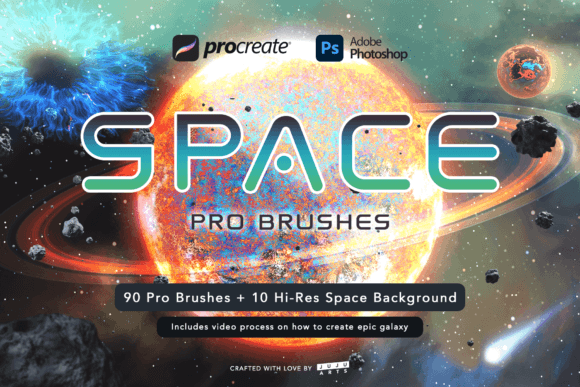
In the vast digital landscape of modern illustration, few subjects capture the imagination quite like the cosmos. The challenge, however, lies not in the desire to create celestial beauty, but in the technical execution required to render it authentically. Stars, nebulae, and swirling galactic arms possess a complexity that can overwhelm even seasoned artists when approached with standard tools. This is where specialized toolsets become indispensable. Space Pro Galaxy Brushes emerges as a comprehensive solution designed to bridge the gap between artistic vision and technical capability, allowing creators to construct massive galaxies and black holes with unprecedented ease and fidelity.
For digital artists working in industries ranging from concept art to book cover design, the ability to generate high-resolution cosmic elements quickly is a significant productivity multiplier. Rather than spending hours painting individual stars or manually blending complex gas clouds, these brushes provide a foundation of carefully crafted textures and forms. The result is a workflow that feels less like laborious construction and more like divine creation, empowering users to truly be the god of the universe within their canvas.
The Architecture of a Digital Universe
At its core, this collection is not merely a set of stamps; it is a sophisticated ecosystem of tools compatible with both Procreate and Photoshop. This dual compatibility ensures that whether you are sketching on an iPad during a commute or refining details on a desktop workstation, your toolkit remains consistent. The package includes 90 total brushes, a number that might seem excessive at first glance but reveals its necessity upon deeper inspection. Each brush serves a specific function in the hierarchy of space painting, from broad atmospheric washes to pinpoint stellar highlights.
Beyond the brushes themselves, the inclusion of 30 fully rendered elements adds another layer of utility. These are not simple shapes but complex, layered assets that can be integrated directly into compositions. When combined with the 10 included nebula backgrounds and 28 planetary element PNGs, the artist is provided with a modular kit for building entire scenes. This approach shifts the creative process from starting with a blank white canvas to assembling and customizing pre-existing high-quality components, significantly reducing the barrier to entry for complex space art.
Understanding the Brush Dynamics
To leverage Space Pro Galaxy Brushes effectively, one must understand how they interact with pressure sensitivity and opacity settings. Unlike flat stickers, these brushes are dynamic. A light touch might produce a faint dusting of distant stars, while increased pressure yields dense clusters or bright supernovae. This responsiveness is crucial for maintaining organic variation in your artwork. Real space is rarely uniform; it is chaotic, layered, and deeply textured. The brushes mimic this randomness through intelligent scattering algorithms and texture overlays.
The collection is divided into functional categories that mirror the natural structure of space phenomena. You will find tools specifically designed for:
- Nebula Clouds: Soft, diffused brushes that allow for the blending of vibrant gases and dust lanes.
- Star Fields: Precision tools for adding depth through foreground brightness and background density.
- Planetary Surfaces: Textures that simulate craters, atmospheres, and geological features.
- Black Hole Accretion Disks: Specialized shapes that help visualize the gravitational warping of light.
By categorizing the tools in this manner, the set encourages a methodical approach to painting. Artists can build their images from the background forward, establishing the mood with nebulae before populating the scene with stars and planets. This logical progression helps maintain visual coherence and prevents the common pitfall of "over-painting," where too many elements compete for attention.
Practical Applications Across Industries
The versatility of this brush set extends far beyond hobbyist illustration. For professional concept artists in the gaming and film industries, time is often the most scarce resource. Being able to generate a believable starfield or a distant galaxy in minutes rather than days allows for rapid iteration during the ideation phase. A concept artist might use the Space Pro.abr files in Photoshop to quickly mock up environmental backgrounds for a sci-fi shooter, testing different color palettes and lighting conditions without committing to final renders.
Similarly, graphic designers working on book covers, album art, or promotional materials for science fiction properties benefit from the high-resolution nature of these assets. The 10 included nebula backgrounds serve as excellent starting points for typography-heavy designs, providing a rich, textured backdrop that does not distract from the text. The 28 planetary elements can be manipulated, colored, and composited to create unique celestial bodies that fit specific narrative requirements, ensuring that the visual identity of a project remains distinct and proprietary.
Educators and content creators also find value in these tools. The included painting process video is not just a tutorial; it is a demonstration of workflow efficiency. By watching how an experienced artist layers these brushes, beginners can learn fundamental principles of digital painting, such as layer management, blending modes, and color theory in low-light environments. This educational component transforms the product from a simple asset pack into a learning resource.
Evaluating Suitability for Your Workflow
Before integrating Space Pro Galaxy Brushes into your pipeline, it is important to assess your current needs. If your work primarily involves realistic, photorealistic space rendering based on astronomical data, you may still need to supplement these brushes with photographic references and manual adjustments. These tools are designed for artistic interpretation rather than scientific simulation. They prioritize aesthetic impact and dramatic flair over strict astrophysical accuracy.
However, for stylized art, fantasy illustrations, and conceptual designs, they are nearly unparalleled. The key consideration is resolution. While the brushes are high-quality, their effectiveness depends on the canvas size you are working with. For large-format prints, ensure that your document settings match the capabilities of your hardware. The brushes scale well, but extreme enlargement may reveal pixelation in the underlying textures if not managed correctly.
Another factor to consider is software proficiency. While the brushes are ready to use out of the box, unlocking their full potential requires a basic understanding of layer blending modes in Photoshop or Procreate. Modes like Screen, Add, and Color Dodge are essential for making stars glow and nebulae shine against dark backgrounds. Users unfamiliar with these concepts may initially find the results flat until they experiment with layer interactions.
Maximizing Value Through Combination
The true power of this collection lies in the synergy between its components. Using a nebula background as a base, an artist can overlay planetary elements using the Space Pro.brushset to add atmospheric haze around the planets, creating a sense of depth and scale. The 30 fully rendered elements can be broken down, with specific parts used as masks or textures for other brushes. This modular approach encourages experimentation.
- Start with the Background: Use one of the 10 nebula backgrounds or paint a custom one using the soft cloud brushes.
- Establish Depth: Add distant star fields using low-opacity scatter brushes to create a sense of infinite space.
- Place Focal Points: Insert planetary elements or create custom planets using the surface texture brushes.
- Add Lighting Effects: Use the accretion disk and glow brushes to simulate light sources, ensuring consistent directionality.
- Final Details: Add bright foreground stars and lens flares to tie the composition together.
This structured yet flexible workflow ensures that even complex scenes remain manageable. It prevents the artist from getting lost in the details too early in the process, a common issue when dealing with intricate subjects like galaxies.
Conclusion: Elevating Cosmic Creativity
In conclusion, Space Pro Galaxy Brushes represents a significant asset for any digital artist looking to explore the cosmos. By combining high-resolution brushes, rendered elements, and educational resources, it offers a holistic approach to space art. It respects the user's time by providing high-quality starting points while leaving ample room for creative customization. Whether you are a professional seeking efficiency or a hobbyist seeking inspiration, this toolkit provides the necessary instruments to craft stunning celestial narratives. As with any tool, mastery comes with practice, but with these brushes, the journey from blank canvas to breathtaking galaxy is shorter, more intuitive, and infinitely more enjoyable.