Hand Drawn Doodle Brushes for Ai: A Practical Evaluation
In the realm of digital illustration and graphic design, the demand for organic, human-centric aesthetics continues to grow. Designers often seek tools that bridge the gap between rigid vector precision and the spontaneous charm of hand-drawn art. Hand Drawn Doodle Brushes for Ai represent a specific category of digital assets designed to meet this need within Adobe Illustrator. This article explores the functionality, utility, and practical considerations of using these seamless, adjustable brushes to enhance creative workflows.
Understanding the Toolset
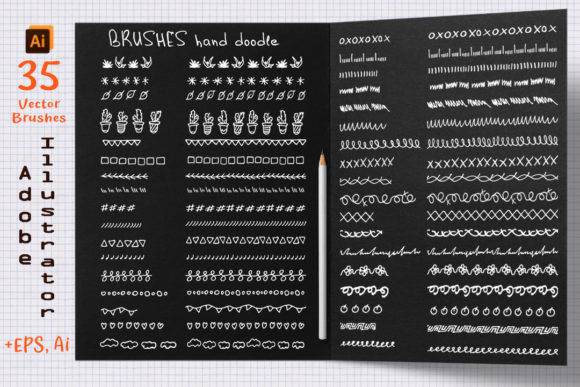
At its core, this product is a collection of 35 flexible, adjustable, seamless brushes. These are not static images but dynamic vector tools created by digitizing hand-drawn elements and converting them into functional brush definitions for Adobe Illustrator. The primary value proposition lies in their versatility and ease of integration into existing design projects. By providing files compatible with Adobe Illustrator CC, as well as an AI10 file for earlier versions and an EPS 10 format for other vector programs, the set aims to accommodate a wide range of software environments.
The term "seamless" refers to the brush's ability to repeat its pattern along a path without visible breaks or awkward transitions at the joints. This is crucial for creating continuous lines, borders, or decorative frames that look natural rather than mechanically tiled. The "adjustable" nature means that users can modify the size, shape, and color of the brush strokes after application, offering a level of control that raster-based doodle packs typically lack.
Why Designers Choose Hand-Drawn Vector Brushes
There are several reasons why a designer might opt for Hand Drawn Doodle Brushes for Ai over creating similar effects from scratch or using raster images. First, efficiency is a significant factor. Drawing complex, consistent doodle patterns manually can be time-consuming. These brushes allow users to draw a simple path and instantly apply a detailed, textured appearance. This speed is particularly beneficial in commercial settings where turnaround times are tight.
Second, scalability is a inherent advantage of vector formats. Unlike pixel-based drawings, which lose quality when enlarged, vector brushes remain crisp at any size. This makes them ideal for projects that require resizing, such as logos that must work on both business cards and billboards, or illustrations intended for various print mediums like posters and t-shirts.
Third, editability is a key benefit. Because these are vector objects, every aspect of the design remains editable. Users can change the stroke weight, adjust the anchor points of the path, or recolor individual elements without degrading the image quality. This flexibility supports an iterative design process, allowing for quick adjustments based on client feedback or creative experimentation.
Practical Applications and Use Cases
The versatility of these brushes makes them suitable for a broad spectrum of design projects. Here are some scenarios where they may be a strong fit:
- Branding and Identity: Adding a playful or artisanal touch to logos and brand marks. The hand-drawn aesthetic can convey approachability and creativity.
- Print Media: Enhancing invitations, business cards, and book covers with decorative borders or background textures. The seamless nature ensures that patterns can cover large areas without repetition artifacts.
- Product Design: Creating unique patterns for textiles, such as pillows or t-shirts. The vector format ensures that the design prints clearly regardless of the fabric size.
- Digital Illustrations: Adding depth and character to digital artwork. These brushes can be used for outlining, shading, or adding whimsical details to characters and scenes.
For designers working in industries that value authenticity and handmade qualities, such as organic food packaging, children’s books, or boutique retail, these tools can help achieve the desired visual tone without requiring advanced drawing skills.
Considerations and Tradeoffs
While Hand Drawn Doodle Brushes for Ai offer numerous benefits, it is important to understand their limitations and requirements. First and foremost, these tools are designed specifically for Adobe Illustrator. They are not compatible with Photoshop as flexible brushes, although the EPS file might be imported as static shapes. Users must ensure they have the correct software version—Adobe Illustrator CC or later for optimal performance, though AI10 support is provided for legacy systems.
Another consideration is the learning curve associated with vector brush tools. While applying a brush is straightforward, mastering the adjustment of brush profiles, pressure sensitivity (if using a tablet), and path manipulation requires practice. Beginners may find that initial results do not match their expectations until they become familiar with how Illustrator handles art brushes.
Additionally, while the brushes are customizable, they are still pre-designed elements. Designers seeking completely unique, one-of-a-kind handwriting styles may find that these brushes, being part of a standardized set, lack the absolute uniqueness of custom lettering. However, for most commercial applications, the balance between consistency and organic feel provided by these brushes is sufficient.
Evaluating Compatibility and Workflow Integration
Before purchasing or downloading, users should verify their hardware and software compatibility. The requirement for Adobe Illustrator CC suggests that users with older hardware or outdated software versions may encounter performance issues or incompatibility. It is advisable to check system requirements and ensure that your version of Illustrator supports the specific brush features utilized in the set.
The inclusion of an EPS 10 file is a thoughtful addition for those using alternative vector software such as CorelDRAW or Affinity Designer. However, functionality may vary across different programs. While the shapes will import, the dynamic brush behavior—such as automatic scaling along a path—may not translate perfectly outside of the Adobe ecosystem. Users of non-Adobe software should test the EPS file thoroughly to ensure it meets their workflow needs.
Making the Decision
Deciding whether to incorporate Hand Drawn Doodle Brushes for Ai into your toolkit depends on your specific design goals and workflow. If you frequently create designs that require organic, hand-drawn elements and work primarily within Adobe Illustrator, this set offers a efficient and scalable solution. It is particularly valuable for designers who need to produce high volumes of work or who want to add a consistent stylistic element across multiple projects.
However, if your work relies heavily on raster-based textures, or if you primarily use Photoshop for illustration, these brushes may not provide the desired flexibility. In such cases, exploring raster brush sets or texture overlays might be more appropriate. Similarly, if you require highly specialized, custom typography, investing in custom lettering services or creating your own unique brushes may yield better long-term results.
Ultimately, Hand Drawn Doodle Brushes for Ai serve as a powerful resource for enhancing vector illustrations with a human touch. By understanding their capabilities, limitations, and ideal use cases, designers can make informed decisions about integrating them into their creative processes. For those looking to streamline their workflow while maintaining an authentic, hand-crafted aesthetic, this toolset presents a compelling option worth considering.
If you have further questions regarding specific compatibility or usage scenarios, reaching out to the creator, Svetlana, can provide additional clarity tailored to your unique project requirements.