Evaluating Gnome Creator Brushes for Procreate
Digital illustration has evolved significantly, offering artists tools that streamline complex workflows and expand creative possibilities. Among the specialized assets available to iPad users are themed brush sets designed to accelerate the creation of specific character types. Gnome Creator Brushes for Procreate represents one such resource, tailored specifically for artists interested in designing whimsical gnome characters. This article examines the composition, utility, and practical applications of this digital toolset to help creators determine if it aligns with their artistic objectives.
Understanding the Product Composition
Before integrating any new asset into a workflow, it is essential to understand what is included. Upon purchasing and downloading Gnome Creator Brushes for Procreate, users receive a single ZIP folder containing one native Procreate file. The installation process is straightforward: users must unzip the folder and import the file directly into the Procreate app. It is important to note that these brushes are engineered exclusively for the Procreate environment on iPad and will not function in other software such as Photoshop, Clip Studio Paint, or desktop-based applications.
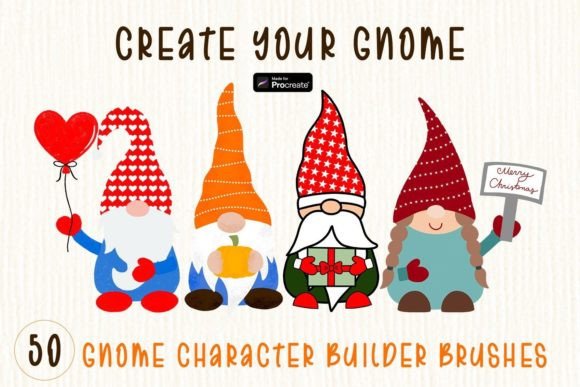
The set comprises a total of 50 distinct brushes, categorized into three functional groups:
- 42 Stamp Brushes: These are pre-designed elements that allow for the rapid assembly of gnome figures. They typically include various hats, beards, bodies, and facial features.
- 4 Decorative Brushes: These tools add embellishments, such as sparkles, snowflakes, or floral accents, to enhance the visual appeal of the character.
- 4 Pattern Brushes: These create repeating textures or backgrounds, useful for adding depth to clothing or surrounding environments.
Primary Use Cases and Applications
The primary value proposition of this brush set lies in its ability to reduce the time required to create consistent, high-quality gnome illustrations. Artists often face the challenge of maintaining proportion and style consistency when drawing repetitive characters. By utilizing stamp brushes, creators can mix and match components to generate unique variations without redrawing basic shapes from scratch.
Seasonal and Holiday Design
Gnomes have become a staple in seasonal decor, particularly for major holidays. This brush set is explicitly designed to accommodate themes for Halloween, Christmas, and Valentine’s Day. For example, an artist can quickly swap a standard hat for a pumpkin-themed one or adjust color palettes to fit a festive aesthetic. This flexibility makes the tool suitable for creating timely content for social media, greeting cards, or seasonal marketing materials.
Sublimation and Print-on-Demand
Beyond digital art, these brushes are frequently used in the production of physical goods through sublimation printing. The high-resolution output of Procreate allows these designs to be scaled for various products, including:
- Mugs and drinkware
- T-shirts and apparel
- Posters and wall art
- Home decor items
For entrepreneurs running print-on-demand businesses, the ability to rapidly prototype and produce diverse designs is crucial. The modular nature of the stamp brushes enables the creation of hundreds of unique combinations, helping sellers keep their inventory fresh without starting each design from a blank canvas.
Benefits and Tradeoffs
When evaluating Gnome Creator Brushes for Procreate, it is necessary to weigh the advantages against potential limitations.
Advantages
The most significant benefit is efficiency. For commercial artists who need to produce volume, the time saved by using pre-made stamps can be substantial. Additionally, the set provides a cohesive style guide, ensuring that all generated characters share a similar aesthetic, which is valuable for brand consistency. The inclusion of decorative and pattern brushes adds versatility, allowing users to complete a composition without needing external texture libraries.
Considerations and Limitations
However, reliance on stamp brushes can lead to a generic look if not customized properly. Since many users may have access to similar assets, standing out requires additional effort in coloring, shading, and composition. Furthermore, the restriction to Procreate means that artists who prefer vector-based workflows or desktop software cannot utilize these tools. It is also worth noting that this is a digital product; no physical items are shipped, so users must be comfortable with digital file management and installation procedures.
Who Is This Tool Best Suited For?
This brush set is an ideal fit for several specific user profiles:
- Print-on-Demand Sellers: Individuals who need to generate large volumes of niche-specific designs quickly.
- Social Media Content Creators: Artists who post daily or weekly holiday-themed content and need a reliable way to produce engaging visuals.
- Hobbyists and Beginners: Those who may lack advanced drawing skills but wish to create professional-looking illustrations for personal projects or gifts.
When to Consider Alternatives
While Gnome Creator Brushes for Procreate offers convenience, it may not be the right choice for every artist. If your goal is to develop a highly unique, hand-drawn artistic style, relying on stamps might hinder your growth. In such cases, investing in fundamental drawing tutorials or custom brush sets that mimic traditional media (such as pencil, charcoal, or watercolor) might be more beneficial.
Additionally, if you work primarily in vector formats for scalable logo design or large-format printing, raster-based Procreate brushes may not meet your technical requirements. Vector alternatives or illustrative packs designed for Adobe Illustrator would be more appropriate in those scenarios.
Final Decision-Making Insights
Choosing the right digital assets depends on your workflow and end goals. If you are already proficient in Procreate and seek to streamline the creation of gnome-themed artwork for commercial or personal use, this brush set offers a practical solution. The combination of stamp, decorative, and pattern brushes provides a comprehensive toolkit for holiday-themed projects.
Before purchasing, consider your current skill level and the specificity of your niche. If gnomes are a central part of your portfolio or product line, the efficiency gains likely justify the investment. However, if you only occasionally create such characters, free resources or general-purpose shape brushes might suffice. Always ensure that your intended use case aligns with the license terms provided by the creator, particularly regarding commercial rights for sublimation and print products.
In summary, Gnome Creator Brushes for Procreate serves as a specialized utility for a specific artistic niche. By understanding its capabilities and limitations, artists can make an informed decision about whether it enhances their creative process or if alternative tools better serve their long-term artistic development.