Evaluating Spray Procreate Brushes for Digital Graffiti and Street Art
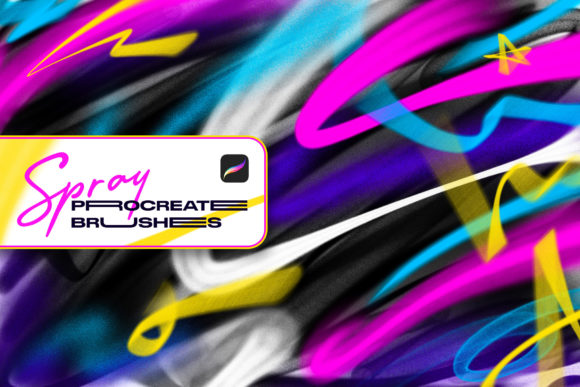
Digital illustration has evolved significantly over the last decade, moving beyond simple vector lines and flat colors into textured, organic mediums that mimic traditional tools with surprising accuracy. For artists working within the Apple iPad ecosystem, Spray Procreate Brushes represents a specialized toolset designed to bridge the gap between physical aerosol art and digital creation. This collection of fourteen brushes aims to replicate the unpredictable, fluid nature of spray paint, offering a viable solution for creators interested in street art aesthetics, graffiti tagging, and urban design elements without the logistical hurdles of real-world spraying.
The primary value proposition of this brush set lies in its ability to simulate different spray caps—specifically fat, thin, and flat caps—through advanced pressure sensitivity. Unlike standard digital brushes that merely change opacity or size, these tools are engineered to respond dynamically to the artist’s hand pressure. A light touch produces a broad, transparent mist, while increased pressure tightens the stream, resulting in a thinner, more opaque line. This behavior mirrors the physics of actual spray cans, making the learning curve intuitive for those with experience in physical graffiti, while remaining accessible to digital natives looking to expand their stylistic repertoire.
Understanding the Mechanics of Digital Aerosol Simulation
To appreciate the utility of Spray Procreate Brushes, one must understand how Procreate’s engine handles brush dynamics. The application allows for complex customization of stroke behavior, but achieving a realistic spray effect requires precise calibration of scatter, jitter, and pressure response. This specific set leverages those capabilities to create a convincing illusion of atomized paint hitting a surface.
The inclusion of multiple cap types is crucial for authentic street art reproduction. In physical graffiti, the "cap" is the nozzle attached to the can, and it dictates the width and softness of the line. A fat cap creates wide, blurry outlines ideal for fill-ins and background washes, while a thin cap allows for sharp details and intricate lettering. By providing digital equivalents of these tools, the brush set enables artists to construct layered compositions that feel grounded in reality. The tilt sensitivity further enhances this effect, allowing users to angle the virtual can for broader coverage or sharper edges, adding another layer of control that static brushes often lack.
Practical Application in Professional Workflows
For professional illustrators, graphic designers, and concept artists, the integration of Spray Procreate Brushes into a workflow offers several distinct advantages. First, it eliminates the health risks and environmental concerns associated with real aerosol paints. Artists can experiment with bold color combinations and large-scale textures in a clean, controlled environment. This is particularly valuable for clients who require rapid iterations or those working in industries where physical mess is impractical, such as editorial illustration or mobile game asset creation.
The brushes are also highly effective for creating atmospheric effects. Beyond strict graffiti styles, the soft, diffused edges generated by the fat cap settings can be used for lighting effects, fog, or abstract backgrounds in commercial projects. Marketers and social media content creators may find these tools useful for adding an edgy, urban aesthetic to promotional materials, helping brands connect with younger demographics who appreciate street culture visuals. The ease of customization means that once a preferred texture is achieved, it can be saved and reused, ensuring consistency across a campaign or project series.
Usability and Customization Features
One of the strongest aspects of this brush pack is its balance between ready-to-use functionality and deep customizability. While the default settings are tuned to provide an immediate, realistic spray experience, Procreate’s native brush studio allows users to tweak every parameter. Artists can adjust the grain source, change the blending mode, or modify the pressure curve to suit their individual drawing style. This flexibility ensures that the brushes do not feel restrictive; instead, they serve as a foundational starting point that can be refined over time.
The user interface within Procreate remains uncluttered, meaning these brushes integrate seamlessly alongside existing libraries. There is no need for external plugins or complicated installation processes. Once imported, the fourteen brushes are immediately available in the brush library. This ease of access is critical for maintaining creative flow, especially during timed projects or live drawing sessions where switching tools needs to be instantaneous.
Limitations and Compatibility Constraints
Despite their strengths, it is essential to address the limitations of Spray Procreate Brushes to manage expectations accurately. The most significant constraint is compatibility. These brushes are formatted exclusively for the Procreate application on Apple iPad. They will not function in Adobe Photoshop, Clip Studio Paint, Affinity Designer, or any other desktop-based graphic editing software. For professionals who rely on a cross-platform workflow, this may require a dedicated iPad setup or a conversion process that could degrade the brush’s dynamic properties.
Additionally, while the brushes mimic spray paint effectively, they are still bound by the limitations of a glass screen. The tactile feedback of pressing a physical nozzle cannot be fully replicated on an iPad, even with Apple Pencil support. Artists accustomed to the resistance of a wall or canvas may need time to adjust their muscle memory. Furthermore, the realistic texture relies heavily on the resolution of the canvas; working at low resolutions may result in pixelation or loss of the subtle grain that defines the spray effect.
Who Benefits Most from This Toolset?
This brush set is ideally suited for a specific segment of the creative community. Urban artists transitioning to digital mediums will find the familiarity of cap styles and pressure dynamics comforting. Illustrators working in genres such as hip-hop culture, skateboarding graphics, or urban fantasy will benefit from the authentic texture these brushes provide. Educators teaching digital art may also find value in using these tools to demonstrate concepts of layering, opacity, and texture without the cleanup required by physical paints.
Hobbyists and serious amateurs interested in exploring street art styles without investing in expensive materials or dealing with legal restrictions on public painting will also find this package appealing. It offers a low-risk entry point into a visually striking art form. However, artists focused on hyper-realistic portraiture or clean vector-style corporate design may find less immediate use for these tools, unless they are specifically tasked with creating grunge or urban-themed elements.
Final Assessment of Value and Long-Term Utility
In evaluating Spray Procreate Brushes, the focus remains on its effectiveness as a specialized tool rather than a general-purpose solution. It excels in its niche, providing a credible alternative to physical spray paint for digital creators. The attention to detail in replicating cap behaviors and pressure responses demonstrates a strong understanding of both the medium and the software.
The long-term value of this asset depends on the user’s commitment to the street art aesthetic. For those who regularly incorporate urban textures into their work, the fourteen brushes offer sufficient variety to handle most tasks, from broad backgrounds to fine details. The ability to customize ensures that the tools can evolve with the artist’s skills. While the exclusivity to Procreate is a limitation for some, it aligns perfectly with the growing number of professionals who have adopted the iPad as a primary creation device.
Ultimately, this brush set is a practical, well-engineered resource for digital artists seeking authenticity in their graffiti and street art projects. It avoids gimmicks in favor of functional realism, making it a worthy addition to any Procreate user’s library who values texture, atmosphere, and urban style. By understanding its specific strengths and compatibility requirements, creators can make an informed decision about whether it fits their artistic goals and technical workflow.