Evaluating Antique Ornate Frame Photoshop Brushes for Digital Design
Digital design often requires a balance between modern efficiency and aesthetic depth. For designers, crafters, and hobbyists who appreciate historical aesthetics, finding the right tools to replicate vintage styles can be time-consuming. This is where specialized assets like Antique Ornate Frame Photoshop Brushes become valuable resources. Rather than manually drawing intricate borders or searching for stock images that may not fit specific dimensions, these brushes offer a streamlined approach to incorporating retro elements into digital projects.
This article explores the utility, benefits, and limitations of this specific brush set, helping you determine if it aligns with your creative workflow and design goals.
Understanding the Asset: What Is Included?
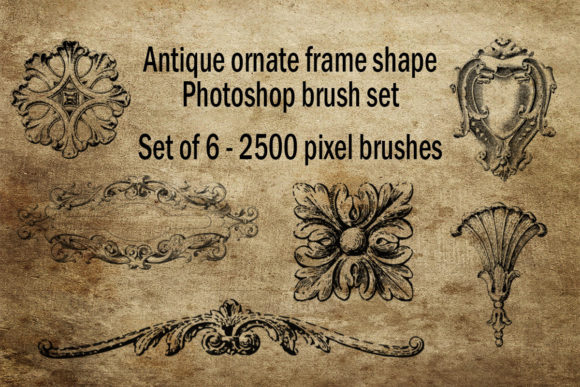
The Antique ornate frame shapes Photoshop brush set is a curated collection designed specifically for Adobe Photoshop users. At its core, this product is an ABR file containing six distinct vintage retro shape brushes. Each brush is engineered to be 2500 pixels in size, ensuring high resolution and clarity even when scaled for larger formats.
Unlike standard round or square brushes, these tools are shaped like decorative frames. When applied to a canvas, they stamp intricate, antique-style borders that mimic the look of classical picture frames, baroque embellishments, and Victorian filigree. The set is tailored for individuals who enjoy vintage and retro aesthetics, providing a quick way to add ornamental details to graphics, crafts, and patterns.
Why Designers Choose Vintage Frame Brushes
The primary appeal of Antique Ornate Frame Photoshop Brushes lies in efficiency and consistency. Creating ornate frames from scratch requires advanced vector skills or significant time investment in raster painting. For many users, especially those focused on content creation rather than pure illustration, this learning curve is a barrier. These brushes lower that barrier by providing pre-made, high-quality shapes that can be applied instantly.
Key Benefits for Creative Workflows
- Time Efficiency: Applying a complex frame takes seconds compared to hours of manual design.
- High Resolution: With a base size of 2500 pixels, the brushes maintain sharpness for print-on-demand products and high-definition web graphics.
- Versatility: The six unique shapes allow for variation without needing multiple different asset packs.
- Customizability: As native Photoshop brushes, they can be rotated, resized, and colored to match any project palette.
For retro lovers, these tools provide an authentic feel that generic geometric shapes cannot achieve. The intricate details inherent in the brush tips capture the essence of historical design periods, adding a layer of sophistication to digital compositions.
Practical Applications and Use Cases
Understanding where these brushes fit best helps in evaluating their worth. They are particularly strong in scenarios requiring decorative boundaries or focal points.
Ideal Scenarios
- Digital Scrapbooking: Crafters can use the frames to highlight photos or journal entries, adding a tactile, vintage feel to digital layouts.
- Social Media Graphics: Influencers and marketers in niches like weddings, antiques, or history can use these frames to create cohesive, themed posts.
- Print-on-Demand Products: The 2500-pixel resolution is sufficient for items like greeting cards, posters, and tote bags, allowing designers to create unique merchandise quickly.
- Web Design Elements: Bloggers can use these shapes as dividers or background elements to enhance the visual appeal of articles related to heritage or classic literature.
In each of these cases, the Antique ornate frame shapes Photoshop brush set serves as a foundational element that accelerates the design process while maintaining aesthetic quality.
Considerations and Tradeoffs
While useful, these brushes are not a universal solution for every design need. It is important to consider their limitations before purchasing or downloading.
Limitations to Keep in Mind
Fixed Aspect Ratios: Shape brushes often have fixed proportions. While you can stretch them, excessive distortion may compromise the integrity of the ornate details. Designers needing highly customizable aspect ratios might find vector-based frame libraries more suitable.
Software Dependency: This set comes as an ABR file, meaning it is exclusively compatible with Adobe Photoshop. Users of Procreate, GIMP, or Affinity Photo will need to convert the brushes or find alternative formats, which may result in quality loss or functionality issues.
Style Specificity: The "vintage retro" style is distinct. If your project requires minimalist, modern, or futuristic aesthetics, these ornate frames will likely clash with the overall design language. They are niche tools for a specific visual identity.
Comparing Alternatives
When deciding whether to use Antique Ornate Frame Photoshop Brushes, it is helpful to compare them with other methods of achieving similar results.
- Vector Shapes (SVG/EPS): Vector files offer infinite scalability without pixelation. They are better for large-format printing but require more software knowledge to manipulate and color effectively.
- Stock Photos: High-resolution images of real frames offer photorealistic texture and lighting. However, they are difficult to integrate seamlessly into flat designs and often come with restrictive licensing terms.
- Manual Illustration: Drawing frames by hand offers complete creative control but is impractical for tight deadlines or non-illustrators.
The brush set sits comfortably in the middle ground: it offers more flexibility than stock photos and is easier to use than vector editing, making it ideal for rapid prototyping and digital composition.
Making the Right Decision
To determine if this set is right for you, consider your current toolset and project requirements. If you regularly use Adobe Photoshop and frequently incorporate vintage elements into your work, these brushes are a logical addition to your library. They are particularly beneficial for those who value speed and ease of use over absolute geometric precision.
However, if you work primarily in vector-based software or require frames that must adapt to dynamic, non-standard dimensions without distortion, you may want to explore vector clip art libraries instead. Additionally, if your design style leans towards minimalism, the ornate nature of these brushes may see limited use.
Ultimately, the Antique ornate frame shapes Photoshop brush set is a specialized tool that excels in its niche. For retro enthusiasts and digital crafters, it provides a practical, high-quality solution for adding decorative flair to their creations. By understanding its capabilities and constraints, you can make an informed decision that enhances your creative workflow without adding unnecessary clutter to your digital toolkit.