Unlocking Textured Creativity with Crayons Procreate Brushes
Digital art has evolved significantly, moving beyond flat vectors and smooth gradients to embrace the tactile, organic feel of traditional media. For many artists, the transition from paper to screen involves a steep learning curve, not just in mastering the software, but in replicating the satisfying resistance and texture of physical tools. This is where specialized toolsets become essential. Crayons Procreate Brushes offer a bridge between the nostalgic charm of childhood art supplies and the powerful capabilities of modern digital illustration. By simulating the grainy, layered application of wax-based mediums, these brushes allow creators to produce work that feels warm, approachable, and authentically handmade.
The appeal of crayon-style artwork lies in its imperfection. Unlike the sterile precision of standard digital pens, crayons introduce noise, variation, and a unique blending behavior that mimics the way pigment catches on the tooth of paper. Whether you are a professional illustrator looking to add a whimsical touch to client projects or a hobbyist seeking a relaxing, low-pressure creative outlet, understanding how to leverage these specific tools can transform your workflow. The key is not just having the brushes, but knowing how to integrate them into a cohesive artistic process.
Overcoming the Sterility of Digital Art
One of the most common challenges digital artists face is the "cleanliness" of their work. Standard brushes often produce lines that are too uniform, lacking the character and depth found in traditional media. This can make illustrations feel cold or overly commercial. Artists often struggle to achieve the soft, diffused edges and rich, layered colors that come naturally with physical crayons. Without the right tools, replicating this aesthetic requires complex layering techniques and manual texturing, which can be time-consuming and frustrating.
Crayons Procreate Brushes address this pain point by embedding the texture directly into the brush engine. When you stroke the canvas, the brush automatically varies opacity and density based on pressure and tilt, simulating the way a real crayon breaks up on rough paper. This immediate feedback loop allows artists to focus on composition and color rather than fighting against the software to create texture. The result is artwork that retains the spontaneity and joy of sketching while benefiting from the undo button and infinite color palette of digital creation.
A Comprehensive Toolkit for Varied Techniques
To truly capitalize on this medium, it is important to understand the specific roles each tool plays within the set. A generic crayon brush might suffice for simple doodles, but a comprehensive suite allows for nuanced expression. The Crayons Procreate Brushes package includes a carefully curated selection designed to cover every stage of the illustration process, from initial sketch to final polish.
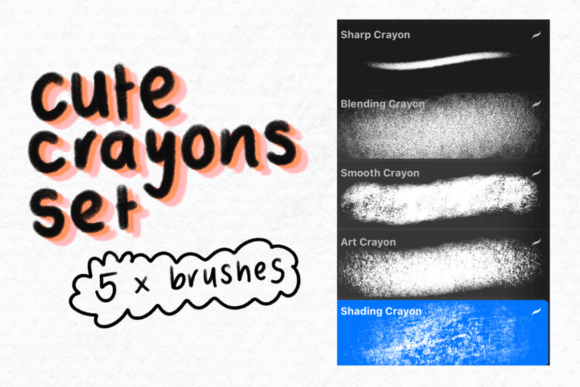
The core of the set features five distinct crayon brushes. These are not merely duplicates; each offers a different level of grain and hardness, allowing you to switch between broad, expressive strokes for background fills and finer, sharper lines for detailed contouring. Having multiple variations prevents visual monotony and adds depth to your piece, much like using different brands or ages of physical crayons.
Beyond standard drawing, the set includes specialized tools for typography and refinement. The lettering brush is engineered to maintain consistent stroke width while retaining the textured edge, making it ideal for hand-drawn titles, greeting cards, and social media graphics. For those who find digital blending difficult, the blending crayon is a game-changer. It smudges existing pixels without adding new color, allowing for smooth gradients and soft transitions that mimic finger-smudging or tortillon blending. Similarly, the shading crayon provides a darker, denser application perfect for building shadow and volume without muddying the underlying colors.
Finally, the inclusion of two art crayons offers a more experimental approach. These brushes likely feature irregular edges or multi-tonal behaviors, encouraging playful mark-making and abstract backgrounds. Together, these eight tools form a complete ecosystem for textured illustration.
Practical Applications and Creative Outcomes
The versatility of these brushes opens doors to various artistic disciplines. Children’s book illustrators, for instance, can create characters that feel friendly and accessible. The inherent warmth of crayon textures resonates well with young audiences, evoking feelings of comfort and nostalgia. By using the lettering brush for dialogue bubbles and the shading crayon for depth, an artist can create a cohesive visual narrative that stands out in a crowded market.
Graphic designers and marketers can also benefit from this aesthetic. In an era where minimalism often dominates branding, a hand-drawn crayon element can humanize a brand. Imagine a skincare company using soft, blended crayon textures to illustrate natural ingredients, or a coffee shop using rough, energetic crayon sketches for their seasonal menu boards. The Crayons Procreate Brushes enable rapid prototyping of these concepts, allowing designers to iterate quickly without needing to scan physical drawings.
For educators and therapists, these tools provide a low-barrier entry to digital creativity. The forgiving nature of crayon strokes means that mistakes are less glaring than with ink brushes. This encourages experimentation and reduces performance anxiety, making it an excellent choice for art therapy sessions or classroom demonstrations where the process is more important than the perfection of the final product.
Implementation and Technical Considerations
Getting started with these tools is straightforward, but proper setup ensures the best experience. It is crucial to remember that the files included are digital brushes that will only work with the Procreate App on iPad. They are not compatible with Photoshop, Clip Studio Paint, or other desktop software. This specificity ensures that the brush engines are optimized for Apple Pencil pressure sensitivity and tilt recognition, providing the most authentic feel possible.
To begin, follow these simple steps:
- Download the file directly to your iPad. Using cloud storage services like iCloud Drive or Dropbox makes this seamless.
- Unzip the file folder. Most iPads can handle this natively through the Files app. If not, a simple third-party unzipping app will suffice.
- Add the brushes to your Procreate app. Tap on the brush library, select "Import," and navigate to your unzipped folder. Select the .brushset file, and they will instantly appear in your library.
If you encounter any difficulties during installation, there are plenty of tutorials available online. However, the process is generally intuitive. Once installed, take time to customize the settings. While the default presets are excellent, adjusting the size limit or streamline settings can tailor the brushes to your personal drawing style.
Tailoring the Experience to Your Needs
Different users will approach Crayons Procreate Brushes in unique ways. A seasoned concept artist might use the blending crayon to quickly block in atmospheric perspective for a landscape, valuing speed and mood over detail. In contrast, a pattern designer might rely on the five standard crayon brushes to create repeating textures for fabric or wallpaper designs, focusing on consistency and tileability.
Beginners should start by limiting their palette. Crayon art looks best when colors are layered rather than mixed digitally. Try using the shading crayon to build depth over a base layer of the standard crayon, rather than selecting a darker color from the wheel. This technique preserves the luminous quality of the medium. Advanced users might experiment with layer blend modes, such as "Multiply" or "Overlay," to enhance the interaction between the crayon texture and underlying colors.
Ultimately, the value of this toolkit lies in its ability to evoke emotion through texture. By removing the technical barriers to achieving a hand-drawn look, Crayons Procreate Brushes empower artists to focus on storytelling and expression. Whether you are creating a heartfelt card for a loved one or a professional illustration for publication, these tools provide the tactile satisfaction of traditional art with the flexibility of the digital age.