Unleash Wild Creativity: A Guide to Using Animal Print Brushes in Procreate
In the vibrant world of digital illustration, texture is often the secret ingredient that transforms a flat image into a tactile experience. For artists using the iPad, Procreate has become the industry standard for its intuitive interface and powerful engine. Among the vast array of tools available, specialized brush sets offer unique shortcuts to complex designs. One such trending tool is the Animal Print Brush Set, a collection designed to streamline the creation of organic, wild patterns directly on your canvas.
This article explores the significance of these specialized brushes, how they fit into modern digital workflows, and provides a practical guide to using the four distinct patterns included in this specific set: zebra, leopard, crocodile, and tiger prints. Whether you are a beginner looking to add flair to your sketches or an experienced designer seeking efficiency, understanding these tools can elevate your creative output.
The Role of Texture in Digital Art
Digital art sometimes suffers from a "too clean" aesthetic. Without the natural imperfections of physical media, illustrations can appear sterile. This is where texture brushes come into play. They simulate the randomness and depth found in nature, adding a layer of realism and visual interest that manual drawing might take hours to achieve.
Animal prints are particularly challenging to draw by hand. Achieving the irregular spacing of leopard spots or the jagged symmetry of zebra stripes requires a keen eye and steady hand. By utilizing pre-made brushes, artists can bypass the tedious repetition and focus on composition, color theory, and lighting. This shift allows for greater creative freedom and faster turnaround times, which is crucial in professional environments like fashion design, packaging, and social media content creation.
Why Choose a Dedicated Animal Print Set?
While generic texture brushes exist, a dedicated animal print set offers precision. These brushes are engineered to replicate the specific biological characteristics of each animal’s coat. For instance, a leopard print brush isn’t just random dots; it mimics the rosette patterns unique to the species. This attention to detail ensures that your artwork remains authentic, even when stylized.
Furthermore, using a cohesive set ensures consistency across your project. When you use brushes from the same developer, they often share similar stroke dynamics and opacity settings, making them easier to blend together. This compatibility is essential for creating complex scenes where multiple textures interact.
Exploring the Four Essential Patterns
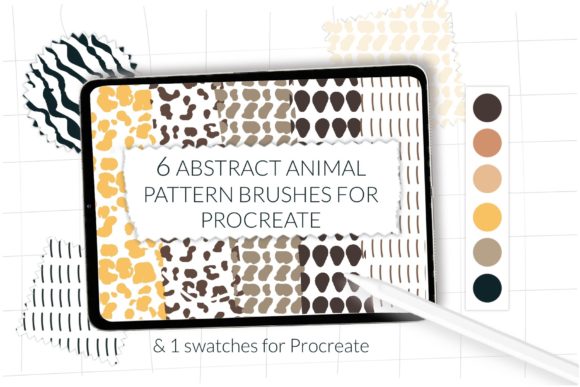
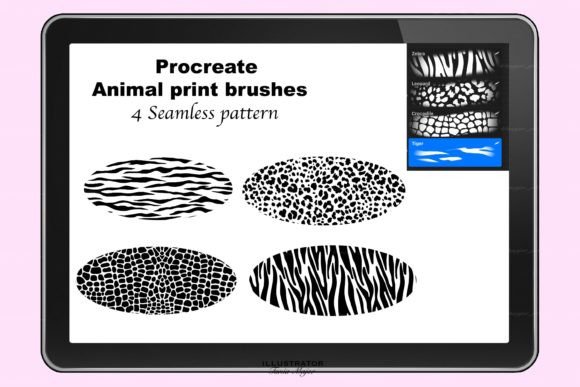
The specific brush set discussed here includes four iconic animal patterns. Each serves a different artistic purpose and evokes a unique mood. Understanding the nuances of each can help you decide when and how to apply them effectively.
- Zebra Print: Characterized by bold, high-contrast black and white stripes, this pattern is excellent for creating graphic, modern looks. It works well in fashion illustrations and abstract backgrounds where strong lines are needed to guide the viewer’s eye.
- Leopard Print: Perhaps the most recognizable animal print, leopard spots convey luxury and wildness. The brush creates soft-edged rosettes that can be layered to create depth. It is ideal for textile design and character accessories.
- Crocodile Print: This texture adds a sense of ruggedness and scale. Unlike the soft fur of the other three, crocodile skin is about geometric plates and rough surfaces. It is perfect for rendering leather goods, armor, or reptilian characters.
- Tiger Print: Similar to zebra but with warmer tones and broken stripes, tiger print offers a fierce yet organic feel. The stripes vary in thickness, providing a natural flow that works beautifully in landscape elements or dynamic character designs.
Technical Requirements and Compatibility
Before diving into creation, it is vital to ensure your hardware and software meet the necessary standards. These brushes are designed exclusively for the Procreate iPad app. They are not compatible with Photoshop, Procreate Pocket (iPhone), or desktop versions of other software. This specificity ensures that the brush engines utilize Procreate’s unique gesture controls and pressure sensitivity features.
To use this set, you must have Procreate Version 5 or higher. Older versions may lack the updated brush engine capabilities required to render the complex shapes and scattering effects used in these animal prints. Keeping your app updated not only ensures compatibility but also provides access to performance improvements and new features that enhance the brushing experience.
Step-by-Step Installation Guide
Installing custom brushes in Procreate is a straightforward process, but it can be confusing for first-time users. Follow these steps to import your animal print brush set correctly:
- Download the File: After purchasing or downloading the brush set, locate the file on your iPad. It will typically be in your "Files" app under the "Downloads" folder. The file extension should be .brushset.
- Open Procreate: Launch the Procreate app on your iPad. You do not need to open a specific canvas yet; you can import brushes from the main gallery view or within an active project.
- Import the Set: Tap on the brush icon in the top right corner to open the Brush Library. At the very top of the list, you will see an option labeled "Import." Tap this button.
- Select the File: Your iPad’s file browser will open. Navigate to the location where you saved the animal print brush set. Tap on the file, and Procreate will automatically install it.
- Locate Your Brushes: The new set will appear at the top of your Brush Library list. You can rename the folder or drag individual brushes into existing folders if you prefer a customized workspace.
Practical Applications in Modern Design
The utility of animal print brushes extends beyond simple illustration. In today’s digital economy, these tools have practical applications in various fields:
Fashion and Textile Design: Designers can rapidly prototype fabric patterns. By adjusting the size and spacing of the brush strokes, one can visualize how a leopard print scarf or a zebra-print dress might look before committing to physical production.
Social Media Content: Influencers and marketers often need eye-catching backgrounds for quotes or product showcases. Animal prints provide a trendy, high-engagement aesthetic that stands out in crowded feeds. Using these brushes allows for quick generation of unique backgrounds that are not generic stock photos.
Educational Materials: For teachers creating digital worksheets or presentations about wildlife, these brushes offer an accurate and engaging way to illustrate animal habitats and characteristics without needing advanced drawing skills.
Tips for Best Results
To get the most out of your animal print brushes, consider the following techniques:
Layering is Key: Don’t rely on a single pass. Use multiple layers with different opacities. For example, lay down a base tiger stripe layer, then add a second layer with a slightly different color and lower opacity to create depth and variation.
Experiment with Blend Modes: Change the layer blend mode to "Multiply" or "Overlay" to integrate the texture with underlying colors. This makes the print look like it is part of the object rather than just stamped on top.
Adjust Streamline: If you are drawing long, flowing stripes manually while using the brush as a guide, adjust the "Streamline" setting in Procreate to smooth out your strokes for a more polished look.
Conclusion
The Animal Print Brush Set for Procreate is more than just a collection of stamps; it is a versatile tool that bridges the gap between technical precision and artistic expression. By understanding the unique qualities of zebra, leopard, crocodile, and tiger prints, and mastering the installation process, artists can significantly enhance their workflow. Whether you are designing the next big fashion trend or simply adding a touch of wild beauty to your digital journal, these brushes provide the texture and authenticity needed to make your art stand out. Embrace the wild side of digital creativity and let these tools inspire your next masterpiece.