Mastering Stipple Brushes for Procreate
Texture is the silent language of digital design, speaking volumes about depth, mood, and authenticity before a viewer even processes the core message. In an era where flat design often dominates screens, introducing organic imperfections can dramatically elevate graphic design projects, making them feel tactile and human. This is precisely where Stipple Brushes for Procreate become an indispensable tool for modern creators seeking to bridge the gap between digital precision and analog warmth.
Elevating Visual Identity with Organic Texture
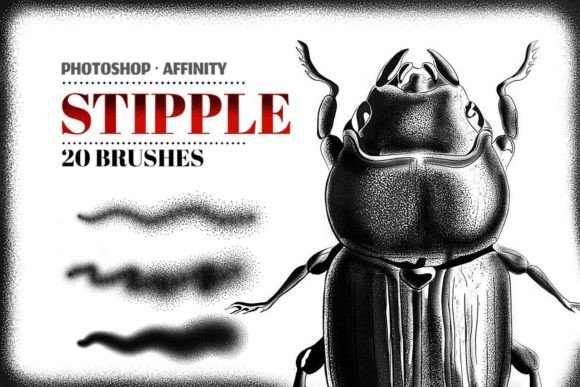
Stippling, a technique rooted in traditional printmaking and illustration, uses countless small dots to create shading and texture. When translated into the digital realm, it offers a unique way to add complexity without clutter. A high-quality set of stipple brushes allows designers to introduce subtle grain and retro aesthetics that resonate with contemporary audiences craving authenticity. These tools are not just about drawing; they are about enhancing brand identity and creating memorable visual experiences.
For professionals managing a diverse design workflow, having reliable assets is crucial. The included set of 20 Stipple Procreate brushes in high resolution ensures that every stroke retains its clarity, regardless of scale. With a maximal brush size of 2000x2000px, you can easily create hi-res illustrations suitable for large-format prints or detailed digital displays. This level of fidelity is essential for maintaining professional presentation standards across various media.
Practical Applications in Modern Design
The versatility of stipple textures extends far beyond simple illustration. Here is how these creative assets can transform specific areas of your work:
- Branding and Logo Design: Add a vintage or handcrafted feel to logos, helping brands stand out in saturated markets by evoking nostalgia and craftsmanship.
- Social Media Graphics: Break the monotony of clean digital feeds with textured backgrounds that stop the scroll and increase engagement.
- Packaging Design: Simulate the look of premium printed materials, giving digital mockups a realistic, tactile quality that appeals to consumers.
- Editorial and Web Design: Use subtle stippling to create visual hierarchy, guiding the reader’s eye through content while adding depth to UI elements.
Optimizing Your Creative Process
Integrating new tools into your routine should enhance, not complicate, your process. To ensure a smooth start, the archive contains the 20_Stipple_Brush.brushset file along with two bonus paper textures. These textures are perfect for layering under your stipple work to achieve a truly authentic, printed-on-paper look. Furthermore, an installation guide for Procreate in PDF format is included, ensuring that even those new to the app can get started immediately.
To use these brushes, you will need the Procreate App on your iPad. Once installed, these stipple brushes are perfect for shading, creating stunning retro graphics, illustration texturing, and in many other ways, like comic illustration. The key to effective use lies in understanding opacity and flow. By varying pressure sensitivity, you can build up density gradually, allowing for nuanced control over light and shadow. This approach supports better visual design outcomes, ensuring that textures complement rather than overpower the composition.
Strategic Tips for Professional Results
When incorporating stipple effects into digital marketing campaigns or client projects, consider the following best practices:
- Maintain Consistency: Ensure that the texture style aligns with the overall brand voice. A gritty stipple effect may suit a rock band’s merchandise but might clash with a corporate financial report.
- Focus on Readability: While texture adds interest, it should never compromise legibility. Use stippling primarily in background elements or as accent details rather than on primary text.
- Leverage Color Palettes: Stippling works exceptionally well with limited color palettes. Experiment with monochromatic schemes to highlight the interplay of light and dot density.
- Scale Appropriately: Take advantage of the high-resolution capabilities. What looks subtle on an iPad screen should remain crisp when exported for print or large-scale advertising campaigns.
Ultimately, the goal of any design asset is to communicate more effectively. By mastering these tools, you enhance your ability to craft compelling narratives through typography, imagery, and texture. Whether you are working on UX design prototypes, packaging design, or social media content, the right texture can evoke emotion and establish trust. Quality creative assets like these stipple brushes empower you to push boundaries, ensuring your work remains fresh, engaging, and visually distinct in a competitive landscape.