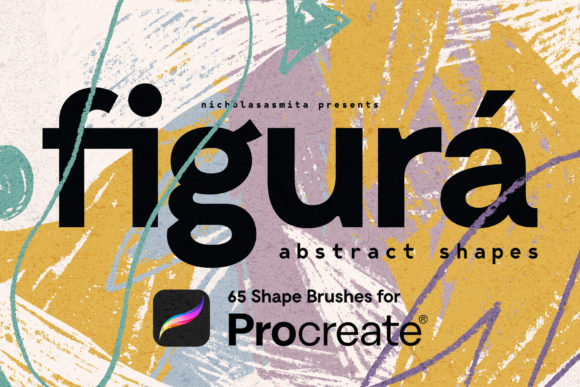
Figura 65 Procreate Shape Brushes: Bringing Organic Texture to Digital Design
Digital art often suffers from a specific kind of sterility. When you draw a perfect circle or a straight line on an iPad, it looks exactly like what it is: mathematically precise and emotionally cold. For designers, illustrators, and content creators who crave the warmth of traditional media, this perfection can be a barrier rather than a benefit. This is where Figura 65 Procreate Shape Brushes steps in to bridge the gap between digital efficiency and analog soul.
Inspired by the raw beauty of abstract painting, these brushes are not just simple vector overlays. They are born from real abstract shapes created with ink, brush, and pastel. Each element was physically painted, scanned, and meticulously crafted into a digital tool that retains the roughness, imperfections, and organic flow of the original stroke. If you are looking to inject playfulness and careless elegance into your work, understanding how to leverage these tools can transform your creative workflow.
Why Organic Imperfection Matters in Modern Design
We live in an era of sleek, minimalist interfaces and polished corporate branding. While clean design has its place, audiences are increasingly drawn to authenticity. There is a human element in a jagged edge, a splatter of ink, or a uneven pastel smear that resonates on a subconscious level. It suggests effort, humanity, and uniqueness.
Figurá, the collection behind these brushes, captures this essence. By using shapes derived from real physical media, you avoid the repetitive, cookie-cutter look that plagues many digital asset libraries. When you use Figura 65 Procreate Shape Brushes, you are not just placing a shape; you are adding texture and history to your canvas. This is crucial for creators who want their work to stand out in a saturated market without spending hours manually texturing every layer.
Practical Applications for Creators and Entrepreneurs
The versatility of these abstract shapes extends far beyond fine art illustration. Here is how different professionals can integrate them into their daily workflows.
Branding and Visual Identity
For small business owners and brand designers, creating a memorable visual identity is about more than just a logo. It is about the supporting elements—the patterns, backgrounds, and accents that appear on social media, packaging, and websites. Abstract shapes from Figurá can serve as unique branding elements that soften a rigid corporate look. Imagine a coffee shop using warm, pastel-derived blobs as background elements for their Instagram stories, or a consultancy firm using sharp, ink-splatter shapes to add dynamic energy to their slide decks. These elements create a cohesive yet relaxed aesthetic that feels approachable.
Digital Content and Social Media
Content creators and bloggers face the constant pressure to produce visually engaging material quickly. Using Figura 65 Procreate Shape Brushes allows for rapid composition. Instead of searching for stock photos that might look generic, you can create custom backgrounds for quotes, product highlights, or announcements. The "careless" nature of the shapes means they do not need to be perfectly aligned. In fact, their charm lies in their spontaneity. You can layer them behind text to create depth, or use them as frames to draw attention to key information.
Print-on-Demand and Merchandise
The demand for unique, artistic merchandise is higher than ever. Whether you are designing phone cases, tote bags, or art prints, abstract shapes offer a timeless appeal. Because these brushes are based on high-resolution scans of real media, they hold up well in print. A designer could create a seamless pattern using a mix of ink and pastel shapes, resulting in a textile design that looks hand-painted. This adds perceived value to the product, allowing sellers to command higher prices for items that feel artisanal rather than mass-produced.
Educational and Presentation Materials
Educators and corporate trainers often struggle to make PowerPoint presentations or educational worksheets engaging. Standard bullet points and clip art can induce boredom. By incorporating abstract shapes as visual anchors, you can break up text-heavy slides and guide the viewer’s eye. A rough, organic shape behind a key statistic makes it pop without the aggression of a bright red arrow. It adds a layer of sophistication and creativity that signals to the audience that care was put into the presentation.
Who Benefits Most from Figurá?
While any digital artist can benefit, certain groups will find immediate value in this specific toolset:
- Freelance Graphic Designers: Who need to speed up their workflow while maintaining a high-end, custom look for clients.
- Social Media Managers: Who need to create consistent, on-brand visuals daily without burning out on complex designs.
- Hobbyist Illustrators: Who want to experiment with mixed-media styles without the mess and cost of physical supplies.
- Small Business Owners: Who handle their own marketing and need easy-to-use tools to elevate their DIY designs.
Considerations Before You Start
Before downloading or purchasing Figura 65 Procreate Shape Brushes, it is important to understand how they fit into your existing toolkit. These are not magic buttons that will automatically make a bad design good. They are ingredients, not the entire meal. To get the most out of them, consider the following:
Layering is Key. The true power of these brushes comes from combining them. Do not rely on a single stamp. Try overlapping a sharp ink shape with a soft pastel smear. Adjust the opacity and blending modes in Procreate to see how the textures interact. This mimics the way real paint behaves on paper.
Color Palette Matters. Since the shapes have inherent texture, they respond differently to color than flat vectors. Muted, earthy tones often highlight the roughness of the brushstrokes, while neon colors might overpower the subtle details. Experiment with monochromatic schemes to let the form take center stage.
Resolution and Scale. Although these are digital brushes, remember their origin. They are designed to retain detail, but stretching a small ink splatter across an entire billboard may result in pixelation. Use them at appropriate scales for your intended output, whether it is a phone screen or a large art print.
Making the Shift from Perfect to Playful
Adopting tools like Figurá requires a slight mindset shift. Many designers are trained to seek precision. However, the beauty of abstract shape brushes lies in their unpredictability. Embrace the accidents. If a shape lands slightly off-center, leave it. If the texture looks rough, lean into it. This "careless" approach is actually a sophisticated design choice that communicates confidence and creativity.
Whether you are designing a new phone case, crafting a wallpaper for your desktop, or building a brand identity from scratch, Figura 65 Procreate Shape Brushes offer a tangible connection to the physical world within your digital workspace. They remind us that even in a pixel-perfect environment, there is room for the messy, beautiful chaos of human expression. By integrating these organic elements, you do not just decorate your work; you give it a pulse.